









在IIS6中.net项目伪静态重写路径的配置方法图解和示例。
1、右键点击 要设置网站的网站
2、属性 ——》主目录 ——》配置——》
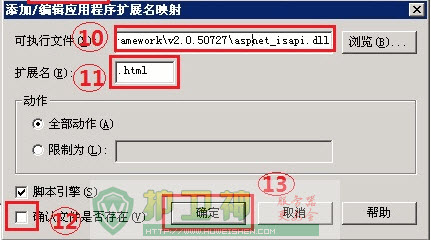
3、如右侧窗口,找到 .aspx 扩展名——》编辑——》复制 可执行文件的路径——》关闭
4、点击 添加——》粘贴 刚复制的 可执行文件路径
5、扩展名填写 .html (如果是 .htm 或者 任意你想要的扩展都可以 前提是以后的应用程序扩展列表里边没有该扩展)
6、不选中 确认文件是否存在
7、确定
iis6 web.config 伪静态配置方法
1、参数用()括起来,使用 $1 来获得参数。
2、多个参数的时候使用&分割。
3、把Intelligencia.UrlRewriter.dll添加到bin目录
<?xml version="1.0"?>
<configuration>
<configSections>
<section name="rewriter" requirePermission="false" type="Intelligencia.UrlRewriter.Configuration.RewriterConfigurationSectionHandler, Intelligencia.UrlRewriter"/>
</configSections>
<system.web>
<httpModules>
<add type="Intelligencia.UrlRewriter.RewriterHttpModule, Intelligencia.UrlRewriter" name="UrlRewriter"/>
</httpModules>
</system.web>
<rewriter>
<!--首页-->
<rewrite url="~/default.html$" to="~/default.aspx" processing="stop"/>
<!--新闻-->
<rewrite url="~/news/list-([A-Za-z0-9-]*).html$" to="~/NewsList.aspx?typeUrl=$1" processing="stop"/>
<rewrite url="~/news/list-([A-Za-z0-9-]*)-([0-9]*).html$" to="~/NewsList.aspx?typeUrl=$1&page=$2" processing="stop"/>
<!--新闻详细-->
<rewrite url="~/news/([A-Za-z0-9-]*).html$" to="~/NewsDetail.aspx?url=$1" processing="stop"/>
</rewriter>
</configuration>




 大小: 1.7M
 git图形化软件(tortoisegit)v2.13.0.1 官方中文版【64位|32位】
  VMware vSphere 5安装无毒版
  邮件服务器(Winmail Mail Server)4.4 中文破解版
  Windos Apache Mysql PHP集成安装环境(WampServer)V3.0.6 官方版
  ISAPI Rewrite3 fullv3.1.0.73 绿色版 安装版
  MaxDOS 网刻服务端(MaxNGS)2.01 绿色免费版
  最简单的ASP本地调试工具NetBox(aspweb.exe)绿色免费版
  20CN迷你Ftp服务器
  Gene6 FTP Server(G6FTP)v3.10.0.2中文破解版
  BareTailPro 已注册版(mysql日志查看工具)2.50a 绿色中文版
  PC变高性能路由器(MikroTik RouterOS)5.16 自动破解版
  Xlight FTP Serverv3.6.5 汉化中文注册版
  端口扫描工具FreePortScannerv3.3.9 绿色英文版
  ossbrowser(Windows32位+64位版)V1.16.0 最新版
  服务器安全一键配置工具v1.0 绿色免费版