


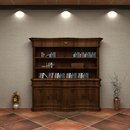











大约有五百多个MAYA材质吧,MAYA很多版本应该都可以用,并不仅局限于MAYA2008版本。
如何自己建立材质库的方法一起打在压缩包里了。
安装方法如下:
1.解压后将在“Shader Libray”文件夹放到C:\Documents and Settings\Administrator\My Documents\maya\projects\default中。
2.打开MAYA后执行:Window-Rendering Editors-Hypershade-Tabs-Create New Tab
在Create New Tab面板中的Initial placement选Bottom,Tab type选Disk。在Root directory中指定新建立的立文件夹Shader Libray,也就是“C:\Documents and Settings\Administrator\My Documents\maya\projects\default\Shader Libray”,New tab name中填Shader Libray,点击Create。这时在Work Area旁就会出现个选项Shader Libray。
OK!安装完毕,怎么使用不用我再罗嗦了吧!
右键点击材质选择唯一选项(import maya fileXXXXX.ma)就OK了,所选材质就出现在上面的materials中,可以使用了。
====================================
1.在C:\Documents and Settings\Administrator\My Documents\maya\projects\default中建立文件夹“Shader Libray”。在再Shader Libray中建立文件夹“.mayaSwatches”。也就是将你下载的“Shader Libray”文件夹放在C:\Documents and Settings\Administrator\My Documents\maya\projects\default中就OK了。
2.执行:Window-Rendering Editors-Hypershade-Tabs-Create New Tab在Create New Tab面板中的Initial placement选Bottom,Tab type选Disk。在Root directory中指定新建立的立文件夹Shader Libray,也就是“C:\Documents and Settings\Administrator\My Documents\maya\projects\default\Shader Libray”,New tab name中填Shader Libray,点击Create。这时在Work Area旁就会出现个选项Shader Libray。现在你下载的Shader Libray中的材质就会出现了,右键点击材质选择唯一选项(import maya fileXXXXX.ma)就OK了,所选材质就出现在上面的materials中,可以使用了。如果你不想自己建材质库下面的步踌没必要看了。
3.在MAYA2008中导入或打开材质ma文件(如文件名为abc.ma)。渲染出格式为iff的图片,执行File-save image,将文件以iff格式保存到“C:\Documents and Settings\Administrator\My Documents\maya\projects\default\Shader Libray\.mayaSwatches”中,修改该文件名,去掉文件后缀“.iff”,在文件名最后加上“.ma.swatch”(如:abc.ma.swatch)。把该文件(abc.ma.swatch)保存到C:\Documents and
Settings\Administrator\My Documents\maya\projects\default\Shader Libray\.mayaSwatches”文件夹中。
4.将刚才渲染的材质ma文件(abc.ma)保存到“C:\Documents and Settings\Administrator\My Documents\maya\projects\default\Shader Libray”中。现在Hypershade中的Shader Libray选项中的ma文件就变成个图像文件了,而格式还是ma文件。



 大小: 4.4M

 AutoCAD 2008 简体中文版(AutoCAD 2008)32位|64位
  CAD字体大全1311款字体
  AutoCAD2013官方简体中文版
  dwg版本转换工具(DWG TrueConvert)多语中文版
  中国国家标准CAD图框模板
  CAD图库大全DWG
  Autocad2013注册机绿色免费版
  AutoCAD 2008注册机和破解文件
  家装辅助设计软件(Sweet Home 3D)V6.6中文安装版
  草图大师中文版7.1.4871 (SketchUp Pro)汉化破解版
  PROE3.0野火版免手动破解版
  CAD迷你画图v2024R3 官方安装版
  我家我设计V6.5绿色中文增强版
  浩辰cad2012简体中文专业版
