


EMD工具箱,在MATLAB中实现EMD的各种功能所必须的工具箱。
工具箱的安装
运行install_emd.m文件可以实现此工具箱的安装,uninstall_emd.m实现卸载。
1、首先下载emd工具箱,50楼网址里面可以下。下载后解压放在matlab的work工作路径下package_emd文件夹。
2、打开matlab,选择File- Set Path- Add with Subfolders-你刚才下载的工具箱(package_emd)点进去- Save- Close。
3、此时选择work下package_emd文件夹作为工作路径,即是C:\Program Files\MATLAB\R2010a\toolbox\package_emd。
4、在Command Window里面输入mex -setup回车,问是否选择已有的编译器你选y回车,再问选择哪个编译器,你可以选择C++的那个选择相应的编号(如 2)回车,然后让你核对是否选择对了编译器等等,你输入y回车。就安装成功了
>> mex -setup
Please choose your compiler for building external interface (MEX) files:
Would you like mex to locate installed compilers [y]/n? y
Select a compiler:
[1] Lcc-win32 C 2.4.1 in C:\PROGRA~1\MATLAB\R2010a\sys\lcc
[2] Microsoft Visual C++ 6.0 in C:\Program Files\Microsoft Visual Studio
[0] None
Compiler: 2
Please verify your choices:
Compiler: Microsoft Visual C++ 6.0
Location: C:\Program Files\Microsoft Visual Studio
Are these correct [y]/n? y
Trying to update options file: C:\Users\Administrator\AppData\Roaming\MathWorks\MATLAB\R2010a\mexopts.bat
From template: C:\PROGRA~1\MATLAB\R2010a\bin\win32\mexopts\msvc60opts.bat
Done . . .
**************************************************************************
Warning: The MATLAB C and Fortran API has changed to support MATLAB
variables with more than 2^32-1 elements. In the near future
you will be required to update your code to utilize the new
API. You can find more information about this at:
http://www.mathworks.com/support/solutions/en/data/1-5C27B9/?solution=1-5C27B9
Building with the -largeArrayDims option enables the new API.
**************************************************************************
MATLAB的emd的工具箱 可是不知道怎么用 也不知道怎么用它来处理txt中的数据
安装中的问题
但是安装的时候,如果使用的是VS的编译器(mbuild –setup、mex –setup设置),会报找不到complex.h的问题(用Linux下的Matlab不会出错),从而使cemdc2_fix.c等文件编译失败,这几个文件是为了快速实现计算EMD而用c编写的,所以即使编译失败,也不影响直接使用emd.m实现EMD功能。如果想编译成功,可如下修改:(摘自http://www.chinavib.com/thread-79866-1-1.html)
G. Rilling 07年3月份的程序,运行作者的install_emd.m,出现找不到complex.h的问题,以下是个人的理解和解决过程:(个人的运行环境为matlab6.5)
complex.h的问题
产生原因:采用matlab的C编译函数mex时,定义了C99_OK的宏(EMDS/make_emdc.m (28行)),利用的是ANSI C99标准如果个人的电脑中没有相关的支持,就会出现这个问题。
解决方法:EMDS/make_emdc.m中第28行中mex(’-DC99_OK‘,args(:))语句中的 '-DC99_OK' 即可。
注意:
改完之后,运行install_emd,会出现M_PI没有定义的问题,缺少了常数PI的宏定义,导致一些.c文件编译失败。
产生原因:去掉C99_OK之后,程序中使用的是作者提供的 emd_complex.h和emd_complex.c两个文件来支持复数运算,这两个文件中,并没有定义M_PI这个宏。
解决方法:M_PI这个宏,只在两个文件中(clocal_mean.c和clocal_mean2.c)使用,个人的解决方法是,在相应的头文件(clocal_mean.h和clocal_mean2.h)中加入M_PI的宏定义即可。
在两个.h文件中分别加入一下语句:
#define CLOCAL_MEAN_H
#ifndef M_PI
#define M_PI 3.1415926
#endif
安装完成后,编译输出的.dll文件会出现,重复后缀名的问题,及 xxx.dll 变成了 xxx.dll.dll自己去掉多余的.dll即可
最后,关于版本问题:作者推荐使用7.1+版本,但只是针对个别的函数有影响,主要是作者提供的例子程序,无法在matlab6.5环境中运行,算法的主要功能函数并不受影响。
工具箱的使用
工具箱函数
运行help index_emd可以查看工具箱提供的函数,如下
index_emd.M list of functions in the EMD package
type help function_name for more information on
a specific function
Empirical Mode Decomposition
emd - computes EMD and bivariate/complex EMD with various options
emd_local -
computes local EMD variation
emd_online - computes on-line
EMD variation. Note that it does not truly
apply on-line: the function is only a demonstration.
emdc - fast implementation for EMD with Cauchy-like stopping
criterion
(requires compilation, see make_emdc function)
emdc_fix - fast implementation for EMD with predefined number of
iterations
(requires compilation, see make_emdc function)
cemdc - fast implementation for bivariate/complex EMD (first
algorithm)
with Cauchy-like stopping criterion (requires compilation,
see make_emdc function)
cemdc_fix -
fast implementation for bivariate/complex EMD (first
algorithm)
with predefined number of iterations (requires compilation,
see make_emdc function)
cemdc2 - fast implementation for bivariate/complex EMD (second
algorithm)
with Cauchy-like stopping criterion (requires compilation,
see make_emdc function)
cemdc2_fix - fast
implementation for bivariate/complex EMD (second algorithm)
with predefined number of iterations (requires compilation,
see make_emdc function)
Utilities
install_emd - setup Matlab's
path and compile the C codes.
uninstall_emd - revert the modifications made by install_emd and
remove the
files (optional).
make_emdc - compile all C codes
emd_visu - visualization of EMD
cemd_visu - visualization of bivariate/complex EMD (automatically
called
by emd_visu when the input is complex)
cenvelope - compute envelope curves for bivariate/complex EMD
cemd_disp - visualization of envelope curves and tube envelope
plot3c - plot a complex vector in 3 dimensions
plotc - plot the projection of a complex vector on a variable
direction
dirstretch -
directional stretching of a complex vector
hhspectrum -
compute Hilbert-Huang spectrum (need the Time-Frequency
Toolbox
http://tftb.nongnu.org)
toimage - transform a spectrum made of 1D functions (e.g., output of
"hhspectrum") in an 2D image
disp_hhs - display the image output of "toimage" as a Hilbert-Huang
spectrum
addtag - add a tag to a graphic object (uses the Tag property as a
list
of keywords or "tags")
rmtag - remove a tag from a graphic object (uses the Tag property
as
a list of keywords or "tags")
hastag - test whether a graphic object has a specific tag (uses the
Tag
property as a list of keywords or "tags")
findtag - find objects having a specific tag (uses the Tag property
as
a list of keywords or "tags")
Examples from G. Rilling, P. Flandrin and P.
Gon鏰lves,
"On
Empirical Mode Decomposition and its algorithms"
IEEE-EURASIP
Workshop on Nonlinear Signal and Image Processing
NSIP-03,
Grado (I), June 2003
emd_fmsin - Fig. 1: a 3-component example (need the Time-Frequency
Toolbox http://tftb.nongnu.org)
emd_triang - Fig. 2: another 3-component example
emd_sampling - Fig. 3: effect of sampling on 1 tone
emd_separation - Fig. 4: separation of 2 tones
ex_online - Sect 3.4: the way emd_online.m works
triangular_signal - subroutine called by emd_triang (formerly
triang.m)
Examples from G. Rilling, P. Flandrin, P.
Gon鏰lves and J. M. Lilly,
"Bivariate
Empirical Mode Decomposition",
Signal
Processing Letters (submitted)
bivariate_EMD_principle - Fig. 1: principle of the bivariate/complex EMD
bivariate_EMD_mean_definitions - Fig. 2: definition of the mean for
each algorithm.
Also allows to test other signals and parameter sets.
bivariate_EMD_illustration - Fig. 3: illustration of the bivariate EMD
on an oceanographic float position record
稍做整理如下:
EMD分解函数
| 函数 | 功能 |
| emd | 计算EMD、双变量/复数EMD |
| emd_local | 计算local EMD |
| emd_online | 计算在线EMD(不是真正在线应用,此函数只是一个示范) |
| emdc | 使用Cauchy-like停止准则的快速EMD实现,需编译 |
| emdc_fix | 使用预定义迭代次数的快速EMD实现,需编译 |
| cemdc | 使用Cauchy-like停止准则的快速双变量/复数EMD实现(方法1),需编译 |
| cemdc_fix | 使用预定义迭代次数的快速双变量/复数EMD实现(方法1),需编译 |
| cemdc2 | 使用Cauchy-like停止准则的快速双变量/复数EMD实现(方法2),需编译 |
| cemdc2_fix | 使用预定义迭代次数的快速双变量/复数EMD实现(方法2),需编译 |
工具函数
| 函数 | 功能 |
| install_emd | 设置Matlab路径,编译c代码 |
| uninstall_emd | 回复install_emd做的修改,移除文件 |
| make_emdc | 编译c代码 |
| emd_visu | EMD可视化 |
| cemd_visu | 双变量/复数EMD可视化(emd_visu的输入是双变量或复数时自动改为调用cemd_visu) |
| cenvelope | 计算双变量EMD的包络曲线 |
| cemd_disp | 显示复数包络曲线 |
| plot3c | 三维中绘制复数向量 |
| plotc | 绘制复数向量在一个可变方向上的投影 |
| dirstretch | 复数向量的方向拉伸 |
| hhspectrum | 计算Hilbert-Huang谱(需要时频工具箱http://tftb.nongnu.org) |
| toimage | 将一个一维函数谱转化为图像 |
| disp_hhs | 以Hilbert-Huang谱的形式显示toimage函数的输出 |
| addtag | 添加标签到一个图形对象 |
| rmtag | 移除标签从一个图形对象 |
| hastag | 测试一个图形对象是否有指定的标签 |
| findtag | 找有指定标签的图形对象 |
来自《On Empirical Mode Decomposition and its algorithms》的Examples
| 函数 | 功能 |
| emd_fmsin | 一个包含3组分的例子(需要时频工具箱) |
| emd_triang | 另一个包含3组分的例子 |
| emd_sampling | effect of sampling on 1 tone |
| emd_separation | separation of 2 tones |
| ex_online | the way emd_online.m works |
| triangular_signal | emd_triang文件调用的子程序 |
来自《Bivariate Empirical Mode Decomposition》的Examples
| 函数 | 功能 |
| bivariate_EMD_principle | 双变量/复数EMD原则 |
| bivariate_EMD_mean_definitions | 各种方法的平均值的定义 |
| bivariate_EMD_illustration | 双变量EMD在海洋漂流位置的应用图解 |
工具箱使用示例
EMD
clc
clear all
close all
% 原始数据
fs = 1000;
ts = 1/fs;
t=0:ts:0.3;
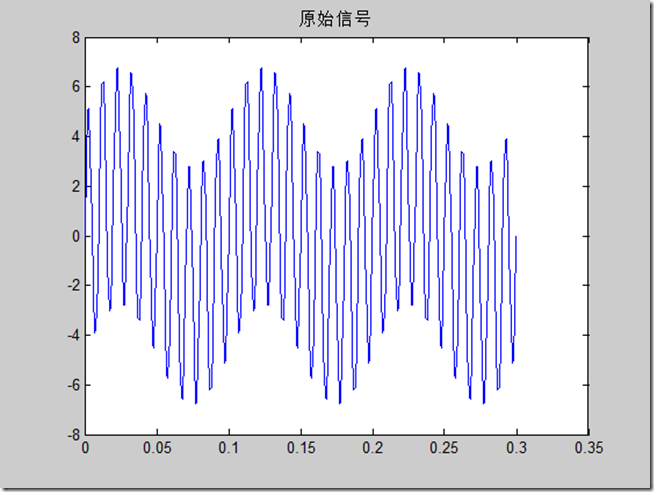
z=2*sin(2*pi*10*t) + 5.*sin(2*pi*100*t);
figure
plot(t, z)
title('原始信号')
% EMD
imf=emd(z);
emd_visu(z,t,imf)
[A,f,tt]=hhspectrum(imf);
[im,tt]=toimage(A,f);
disp_hhs(im);



边际谱
clc
clear all
close all
% 原始数据
fs = 1000;
ts = 1/fs;
t=0:ts:0.3;
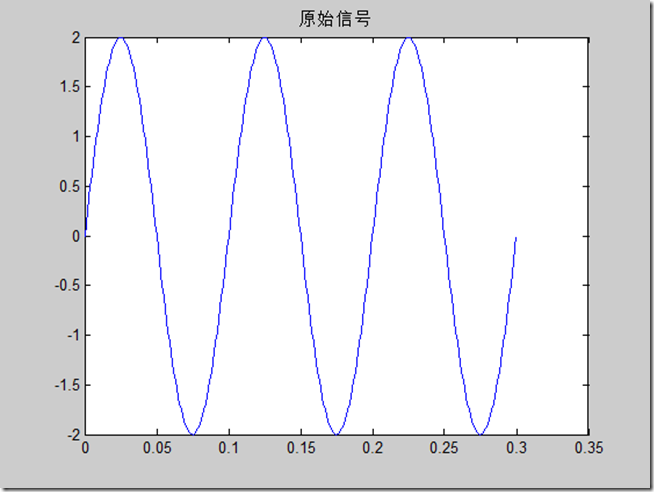
y=2*sin(2*pi*10*t);% + 5.*sin(2*pi*100*t);
figure
plot(t, y)
title('原始信号')
% 求Hilbert-Huang谱
[A,fh,th] = hhspectrum(y);
figure
subplot(211)
plot(th*ts, A)
title('瞬时幅值') % 就是包络
subplot(212)
plot(th*ts, fh*fs)
title('瞬时频率')
% 显示结果
[im,tt,ff] = toimage(A,fh,th);
disp_hhs(im,tt)
colormap(flipud(gray))
% 编程实现显示
figure
imagesc(tt*ts,[0,0.5*fs],im);
ylabel('frequency/Hz')
set(gca,'YDir','normal')
xlabel('time/s')
title('Hilbert-Huang spectrum')


例子程序
更详细的使用说明可以参见例子程序,如emd_fmsin.m程序,运行结果如下
EMD分解如下


可以看到,EMD实现的3个组分的分离(即分别分解到了IMF1~3中),可见EMD的强大功能。

 大小: 8KB
 大小: 89.5M
 终端仿真器 SecureCRTv7.1.1.264 最新版
  串口调试小助手1.3 免费版
  WinHex 十六进制编辑器v20.2 SR-5 绿色中文注册版
  小旋风ASP服务器安装版
  16进制转换工具V1.0 中文绿色版
  Adobe AIRV33.1.1.932 官方最新版
  github离线安装包64位版V2.9.11官方最新版(github desktop)
  MSDN Library Visual Studio 6.0(VC、VB、VF、VJ)中文版win32开发人员必备
  版本控制软件(SourceTree)v3.4.6 官方最新版
  Memory Analyzer (MAT)V1.01 免费绿色版
  Delphi Distillerv1.85绿色版
  IBM内存检测工具(IBM Thread and Monitor Dump Analyzer for Java)V4.3.3 绿色版
  .NETv3.0 可再发行组件包
  一键安装JSP环境安装版
  slave4j(基于eclipse插件的java代码生成器)V1.0.0 正式版
  Auto DebugProfessional 5.6.5.18 中文绿色版
  Understand For C++V1.4.319英文安装版