








微软的内码转换工具
可以让非Unicode的软件在Windows XP/2003上运行,即可以同时执行简繁体日文等软件
applocale使用方法:
先安装,然后点开始菜单,在所有程序上找到Microsoft Applocale,再找到Applocale,点进去,然后下一步,选启动应用程序,再点浏览,选择你要进行转换的乱码游戏的EXE运行文件

点“浏览”找到游戏执行文件

选日本语就可以了.
然后点下一步,在应用程序的语言上选中文(繁体),然后点下一步,最后你可以选择创建快捷方式,那你下次进入是就不用慢慢再做一次了,最后按完成!那你进入游戏后就会发现乱码问题都解决了!!哈哈!!很爽吧!!如果你下次要再进入,就直接从开始菜单那里进入就可以了!!
注意app并不是万能的,一些游戏用这个依旧不能玩,如果报错不能玩就换NTLEA或者LocaleSwitch这两个软件吧,总有一个能用的。
常用语言的补丁包:
全部是微软官网链接,可以放心使用: 繁体中文: http://download.microsoft.com/download/officexpstandard/ie_zht/1/w98nt42kme/en-us/ie_zht.exe
日文: http://download.microsoft.com/download/OfficeXPStandard/ie_ja/1/W98NT42KMe/EN-US/ie_ja.exe
韩文: http://download.microsoft.com/download/officexpstandard/ie_ko/1/w98nt42kme/en-us/ie_ko.exe 安装后需重新启动
更新日志:
1.0 What is AppLocale
Unicode based platforms, such as Windows XP, emulate the language environment required to run non-Unicode applications by internally converting application's non-Unicode text data to Unicode using a system-wide variable commonly called the system local (or language for non-Unicode applications). The language of the non-Unicode applications should be of the same script or family as the one defined by the system locale. Failing to meet this condition results in display of garbage characters in the UI of the application.
This approach has few usability limitations:
- Only an administrator has the ability of setting the system locale value.
- Setting the system locale requires a system reboot.
- Only one system locale can be set at a time.
AppLocale (or Application Locale) is a temporary solution to these limitations caused by non-Unicode applications running on the Unicode (UTF-16) based Windows XP. AppLocale detects the language of the legacy application and simulates a corresponding system locale for code-page to/from Unicode conversions.
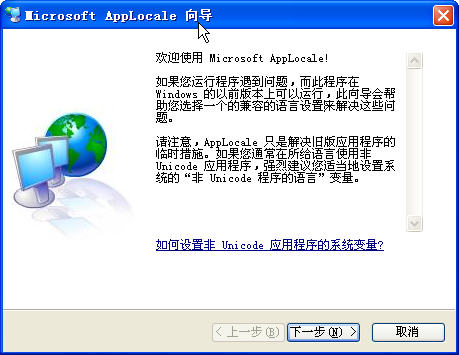

 大小: 7.3M

 鲁大师绿色版v5.1020.1220.729 去广告版
  系统引导编辑修复工具(EasyBCD)2.2.0.182 中文版
  360眼睛卫士绿色独立版
  cpu优化工具(ProcessLasso)V9.0.0.483 绿色中文特别版
  XP系统修复工具1.0 汉化绿色免费版
  魔方6.20 官方最新版
  日漫风格的快速启动(SAO Utils)Alpha2 中文版
  变速精灵V2.63 绿色免费版
  365智能优化(Wise Care 365)V6.4.4.622 中文官方版
  小白软件管家v5.0.0 官方最新版
  超级兔子20132013.3 官方版
  系统引导文件快速修复工具v1.0 绿色免费版
  闪迪ExpressCache SSD 软件v1.0.100.0 官方安装版
  超级兔子2009.04标准版
  360系统急救箱64位版v5.1.64.1251 官方最新版
  360雷电OS系统v1.0.0官方最新版
  雨林木风(YlmF) 系统 DIYY1.6
  系统优化OOCleverCacheV7.1汉化专业版
  Windows优化大师V7.99 Build 10.308 免安装光盘特别版
  先试试不知道好不好使呢