









PDF加密小工具,由论坛用户原创制作分享的一个PDF加密工具,可以设置密码,将pdf文档一键加密,可以分别设置浏览密码和编辑密码,给你的重要文档设置双重保护。本站提供PDF加密工具单文件程序下载,其中源码数据如下,需要对PDF文件进行加密处理的朋友们可以下载试试。
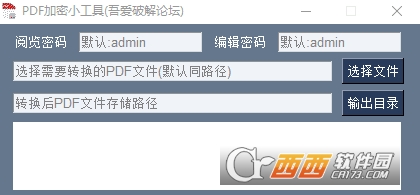
PDF加密工具功能
设置pdf文档加密和编辑密码
自由设置文件路径格式
源码一览
# -*- coding: utf-8 -*-
# ☯ Author: ChinaPython
# ☯ Date : 2021/9/16 19:01
import os
import PySimpleGUI as sg
from PyPDF2 import PdfFileWriter
from PyPDF2 import PdfFileReader
class EncryptTool:
def __init__(self):
self.layout = [
[
sg.Text(text="阅览密码"),
sg.InputText(do_not_clear=True, default_text="默认:admin", text_color='gray', key='psw_a', size=(17, 1)),
sg.Text(text="编辑密码"),
sg.InputText(do_not_clear=True, default_text="默认:admin", text_color='gray', key='psw_b', size=(17, 1)),
],
[
sg.Input(do_not_clear=True, default_text='选择需要转换的PDF文件(默认同路径)', text_color='gray', key='path'),
sg.FileBrowse(button_text='选择文件', key='file'),
],
[
sg.Input(do_not_clear=True, default_text='转换后PDF文件存储路径', text_color='gray', key='path2'),
sg.FolderBrowse(button_text='输出目录', key='folder'),
],
[sg.Text(text="", size=(48, 4), background_color="white", text_color="red", key="msg")],
[sg.Button(button_text='开始加密', key='start', size=(48, 2))],
]
self.window = sg.Window('PDF加密小工具(吾爱破解论坛)', self.layout, icon='icon.ico')
@staticmethod
def __encrypt(unencrypted_pdf, read_password, encrypted_pdf=None, owner_password=None):
unencrypted_pdf = "加密_" + unencrypted_pdf if encrypted_pdf is None else unencrypted_pdf
owner_password = owner_password if owner_password is None else owner_password
try:
content = PdfFileReader(unencrypted_pdf)
writer = PdfFileWriter()
[writer.addPage(content.getPage(page)) for page in range(content.getNumPages())]
writer.encrypt(user_pwd=read_password, owner_pwd=owner_password, use_128bit=False)
with open(encrypted_pdf, 'wb') as out:
writer.write(out)
return os.path.exists(encrypted_pdf)
except Exception as e:
return e
# 运行入口
def run(self):
while True:
event, values = self.window.Read()
if event == 'start':
a, b, c, d = values['psw_a'], values['psw_b'], values['path'], values['path2']
if os.path.exists(c) is False or str(c).lower().endswith(".pdf") is False:
self.window.Element('msg').Update("加载目录失败,请检测路径的合法性")
continue
a = "admin" if "默认:" in a or len(a) == 0 else a
b = "admin" if "默认:" in b or len(b) == 0 else b
filepath, filename = os.path.split(c)
d = f"{d}/加密_{filename}" if os.path.isdir(d) is True else f"{filepath}/加密_{filename}"
msg = self.__encrypt(c, a, d, b)
if msg is not True:
self.window.Element('msg').Update(f"加密失败:{msg}")
continue
self.window.Element('msg').Update(
f"阅览密码:{a}\n编辑密码:{b}\n目标文件:{c}\n输出文件:{d}"
)
if event is None:
break
self.window.close()
if __name__ == '__main__':
start = EncryptTool()
start.run()


 大小: 58.1M
 Advanced PDF Password Recovery Pro5.0.5 汉化纯净安装版
  winrar密码破解(RAR Password Recovery Magic)v6.1.1.263 中文绿色版
  RAR Password UnlockerV5.0.0.0 特别版
  PDF Password Remover(所有者密码清除)v3.1 汉化绿色版
  zip密码破解(ZIP Password Recovery Magic)v6.1.1.175 中文绿色版
  BIOS密码清除器绿色版
  DVD decrypter(DVD解密软件)v3.5.4.0中文绿色版
  office系列软件密码恢复(Office Password Recovery Magic)v6.1.1 简体中文绿色版
  SDisk个人密盘V6.0绿色中文特别版
  异或加解密工具特别版
  RAR Password Enumerator(解加密的RAR文件的工具)V1.3.4.2中文绿色免费版
  著名开源数据加密工具发布TrueCryptv7.0 多语绿色版
  Facebook帐户密码取回工具(FacebookPasswordDecryptor)1.6 绿色版
  PGP Desktop Professionalv9.9
  中原文件夹加密v3.1 绿色特别版
  Ashampoo Magical Security 2V2.02 中文注册版
  小小Access密码查看器V1.1简体中文绿色免费版