MongoDB是一个独立的服务器,如MySQL或PostreSQL 一样,MongoDB提供侦听端口以便接入。MongoDB使用类似JavaScript或PHP 的类型处理方式。也就是说,数据库是灵活的弱类型。它提供了用于查询,创建,更新和删除的工具。从理论上讲,你使用它的工作方式相同:连接,执行任务并关闭连接
安装


到这里mongodb就已经安装成功了。
创建存储数据的文件夹
如下图,在D盘下创建一个用于装数据的data文件夹。

指定数据存储路径并启动服务
在cmd下进入刚刚mongoDB安装的路径,如下图:

启动服务
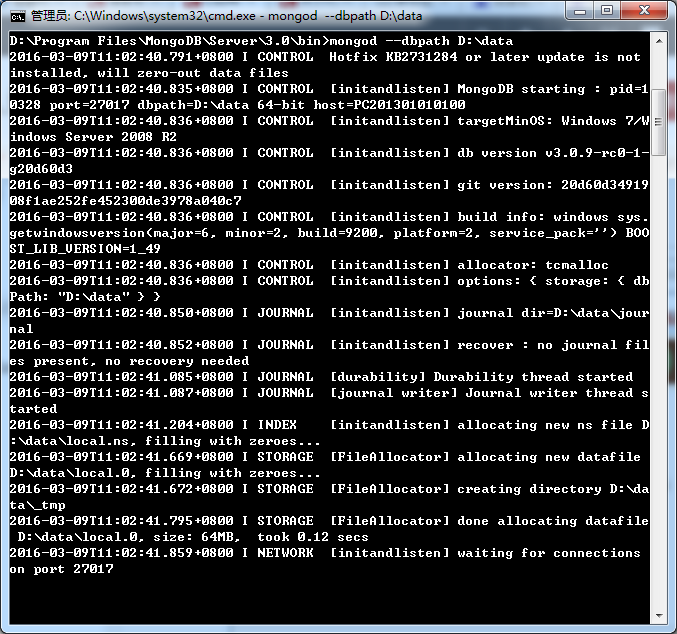
执行指令:mongod –dbpath D:\data(这里注意前面是两个-,markdown不知道为什么显示出来就只有一个-了,见下图中的指令),其中D:\data为数据存放的位置。如下图这启动成功。
验证服务是否已经启动
在浏览器下打开:http://localhost:27017/,如果出现下图效果则说明服务已经启动成功: 
MongoVUE安装
下载MongoVUE
下载解压后效果如下:

安装
如下图:


不多做解释,到此MongoVUE已经安装完成.
破解
将解压zip下“破解补丁”文件夹中的“MongoVUE.exe”文件替换到安装文件目录下,如下图:

替换到

到此,破解已经完成。
建立连接
先打开MongoVUE,按如下图流程


基础操作
创建表
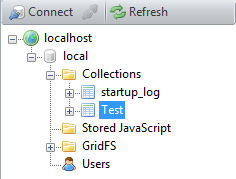
右键数据库,点击add Collection,如下图:


添加数据
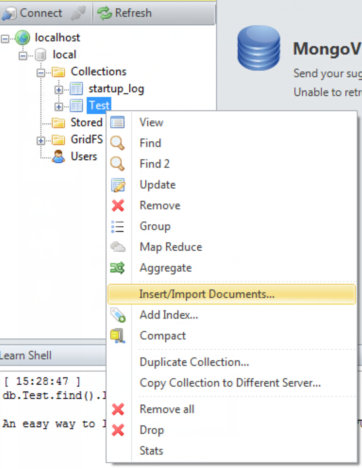
选择刚刚添加的表,右键,选择Insert/Import Documents,如下图:

查看log日志
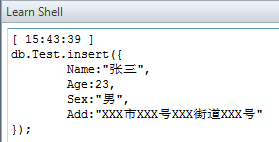
db.Test.insert({    Name:"张三",
    Age:23,
    Sex:"男",
    Add:"XXX市XXX号XXX街道XXX号"});
查询
如下图,最基础的查询:

基本查询,在{find}中输入Json
如:{Name:”张三”}
db.Test.find({ "Name" : "张三" }).limit(50);db.Test.find({ "Name" : "张三" }).limit(50).explain();日期查询
需要通过ISODate函数将日期进行格式话,如:{“InsertDate”:ISODate(“2016-03-09T16:00:00Z”)}
查询大于,小于,大于等于,小于等于

db.Test.find({ "Age" : { "$gt" : 50 } }).limit(50);db.Test.find({ "Age" : { "$gt" : 50 } }).limit(50).explain();\$lt:小于 \$lte:小于等于 \$gt:大于 \$gte:大于等于
右击表格,点击Find2,比Find多了一个where;写表达式,如下图:

db.Test.find({ "$where" : "this.Age==23 || this.Age==50" }).limit(50);db.Test.find({ "$where" : "this.Age==23 || this.Age==50" }).limit(50).explain();排序${Sort}
如下图,在${Sort}中输入Json:{Age:-1},即对Age字段进行排序:

注:当大于0的时候为升序,小于0的时候则为降序
db.Test.find({ "$where" : "this.Age==23 || this.Age==50" }).limit(50).sort({ "Age" : -1 });
db.Test.find({ "$where" : "this.Age==23 || this.Age==50" }).limit(50).sort({ "Age" : -1 }).explain();
查询字段${Fields}
如下图,查询_id和这些个字段{Name:1,Age:1}

db.Test.find({ "$where" : "this.Age==23 || this.Age==50" }, { "Name" : 1, "Age" : 1 }).limit(50).sort({ "Age" : -1 });db.Test.find({ "$where" : "this.Age==23 || this.Age==50" }, { "Name" : 1, "Age" : 1 }).limit(50).sort({ "Age" : -1 }).explain();注:当等于1的时候,就是查询_id和和等于1的字段;当如果等于0时,就是查询除了等于0的字段之外的所有字段,如下图:
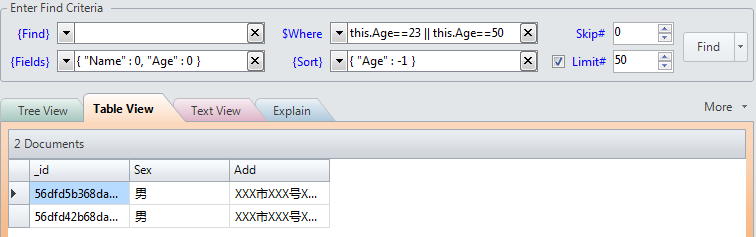
db.Test.find({ "$where" : "this.Age==23 || this.Age==50" }, { "Name" : 0, "Age" : 0 }).limit(50).sort({ "Age" : -1 });db.Test.find({ "$where" : "this.Age==23 || this.Age==50" }, { "Name" : 0, "Age" : 0 }).limit(50).sort({ "Age" : -1 }).explain();skip跳过
当skip>0的时候表示跳过多少行,比如skip=1,表一起有2条数据,那么就只会查询出第二条数据。
Limit分页
表示每次查询多少行,0的时候标识查询所有,>0则查询指定的行数。
修改
右键表,选中update

db.Test.update({ "Age" : 24, "$isolated" : "true" },{$set:{Age:27,}});db.Test.find({Age:24});删除数据
右键表,选中remove,在窗口中输入如下json即可完成删除
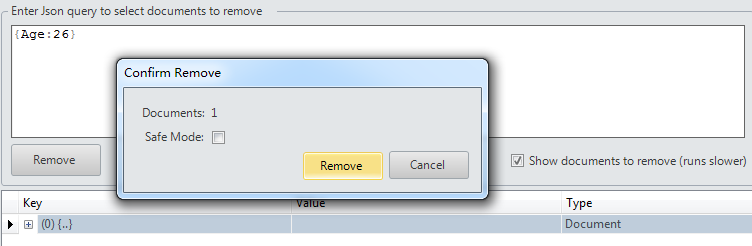
db.Test.remove({ "Age" : 26 });Over,后续有进一步研究,持续完善…

 喜欢
喜欢  顶
顶 难过
难过 囧
囧 围观
围观 无聊
无聊