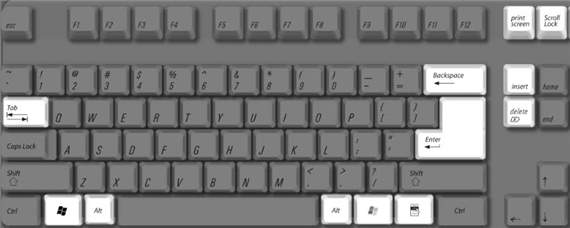
一般情况下,小伙伴用的电脑都是Windows系统和mac系统的,这两个系统在使用上有区别,键盘也是有区别的,下面西西小编为大家带来mac和windows键盘对照。
mac和windows键盘对照
Sample Apple Keyboard (Ultra–thin USB)
Key mappings for Microsoft Windows features
Below is a chart of keyboard functions specific to the Microsoft Windows, and equivalent key combinations as they are mapped to Apple keyboards by the Apple Keyboard Support driver.

| Function | PC keyboard | Apple Keyboard (Ultra–thin USB) |
| Print Screen |  |  |
| Scroll Lock |  |  |
| Pause/Break |  |  |
| Backspace delete |  |  |
| Insert |  |   |
| Number lock |  |  |
| Alt (Option) |  |  |
| Enter |  |  |
| AltGr / Alt GR | (Right Alt key) | |
| Forward delete |  |  |
| Applications |  | -- |
| Windows logo (Start menu) |  |  |
Key mappings for Boot Camp features
Some keys are only available on a keyboard designed for Apple computers. They are either named differently or simply not available on a Windows-compatible keyboard.
Apple Keyboard (Ultra–thin USB) keyboards provide certain keys that are not available on Windows/PC keyboards.

| Function | PC keyboard | Apple Keyboard (Ultra–thin USB) |
| Brightness down | -- |  |
| Brightness up | -- |  |
| Volume down | -- |  |
| Volume up | -- |  |
| Mute | -- |  |
| Media eject | -- |  |
| Media eject secondary optical drive | -- | |
| Clear | -- | |
| Fn (Function) | -- | |
| Exposé | -- |  |
| Dashboard | -- |  |
| Rewind | -- |  |
| Play/Pause | -- |  |
| Fast Forward | -- |  |
Numeric keypad mappings
Apple external and built-in keyboards provide the same functionality as Microsoft-compatible numeric keypads.Note: The Apple Keyboard (Ultra–thin USB) does not utilize alternate numerical keyboard functions as seen on built-in Mac keyboards.
To enable numerical input, press Num Lock on a PC keyboard, or Clear on the Apple keyboard.
The chart below shows equivalent keystrokes.
| Function | PC keyboard | Apple Pro keyboard |
| Page Up |  |  (Numlock off) (Numlock off) |
| Page Down |  |  (Numlock off) (Numlock off) |
| Insert |  | (Numlock
off) |
| Decimal Point |  |  (Numlock off) (Numlock off) |
| Delete | | (Numlock off) |
| Up arrow |  |   (Numlock
off) (Numlock
off) |
| Down arrow |  |   (Numlock
off) (Numlock
off) |
| Left arrow |  |   (Numlock
off) (Numlock
off) |
| Right arrow |  |   (Numlock
off) (Numlock
off) |
以上就是西西小编为大家带来的mac和windows键盘对照,希望大家喜欢。

 喜欢
喜欢  顶
顶 难过
难过 囧
囧 围观
围观 无聊
无聊